Feature
In-meeting polls
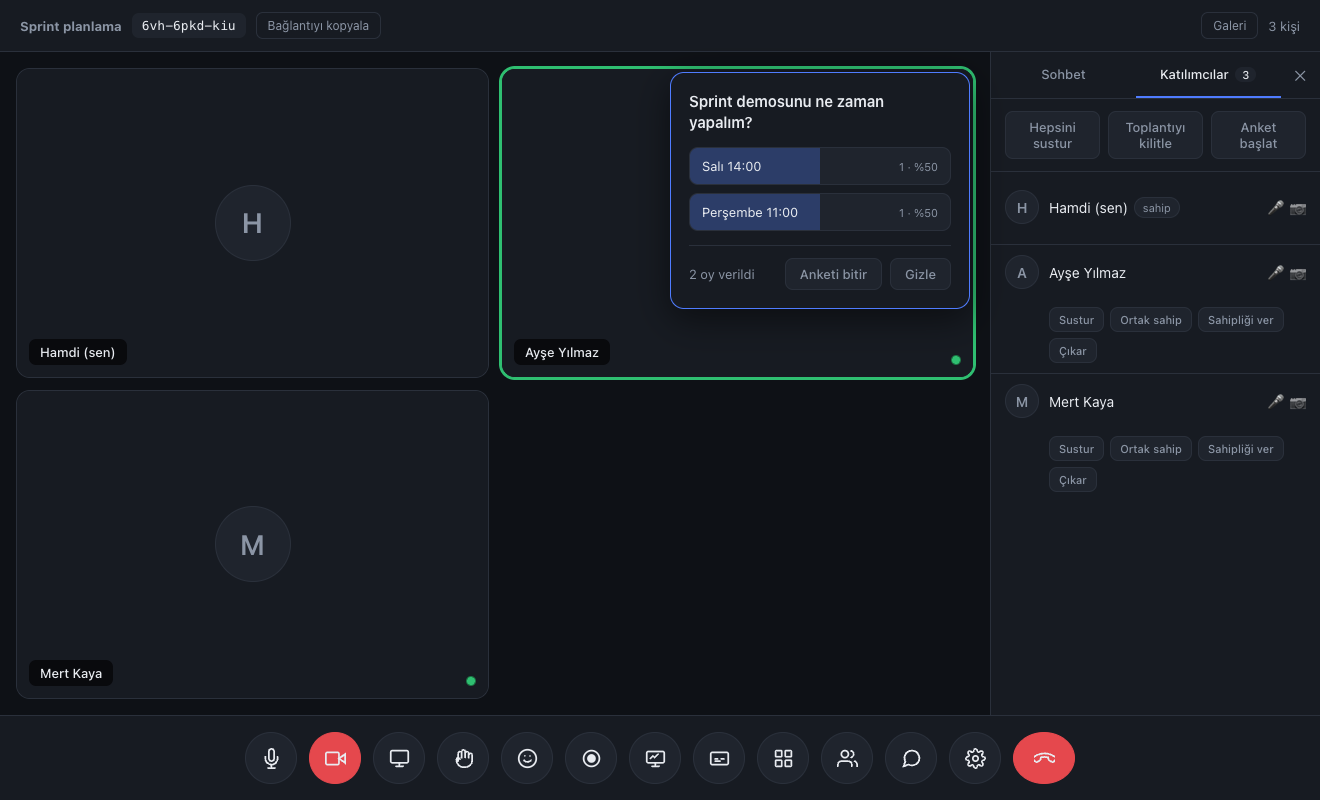
While voting is open only the host sees the results. Nobody votes by watching someone else.
No app, no plugin, no account. They click the link and they're in the meeting.
See plansWith nobody taking notes, what was said, what was decided and what comes next were all written up.
How it worksThanks to the fixed room code they set the calendar invite up once and never sent a link again.
Read the storyA 15-minute live demo: try it with your own team, ask your questions, then decide.
Request a demoWhile voting is open only the host sees the results. Nobody votes by watching someone else.
When a question is asked out loud, the first person to answer sways the rest. If two people say yes, the third won't object. Everyone leaves the meeting saying "we decided" when in fact nobody was convinced.
A participant sees only the options — not who voted for what, nor the distribution. They make up their own mind.
The host sees votes in real time — how many people have voted and how they're split — and decides whether to wait.
A participant can change their vote; the second replaces the first and isn't counted twice.
When you close the poll the result bars appear for everyone. The decision emerges transparently.
The "Participants" tab in the side panel.
Only the host and co-hosts can see it.
At least two options, at most six.
The poll appears on everyone's screen.
The results open up to everyone.
No. You only see the overall distribution. The poll is a secret ballot — that was a deliberate design choice.
Yes. Once you've ended one poll you can start another.
Yes. When they enter the room, any open poll appears on their screen.
Lawyer, accountant, therapist, coach. Let your client join without downloading an app, while you appear under your own brand.
Split the class into groups, write on the board together, take attendance with a poll. The student needs to know nothing beyond the link.
The weekly meeting link never changes. Board, polls and file sharing live inside the call — no separate tool subscription.